Most brand owners hit the same wall: they spend weeks describing their product to manufacturers through email threads, hand-drawn sketches, and long phone calls, only to receive a sample that misses the mark entirely. Apparel design software changes that dynamic completely. These seven strategies will make your manufacturer conversations faster, clearer, and far more productive.
The gap between what a brand owner imagines and what a factory produces is, in most cases, a communication problem. You picture a specific collar construction, a precise inseam measurement, a fabric weight that hits a certain drape. Your manufacturer pictures something else entirely. Apparel design software closes that gap by giving both sides a shared visual language.
The Business Research Company projects the fashion design software market will grow from $2.7 billion in 2024 to over $3 billion in 2025, driven by brands adopting digital tools to reduce sampling waste and speed up production timelines. The brands moving fastest are the ones using software not just to design, but to communicate.
This guide is for brand owners at any stage, whether you are preparing your first collection or scaling your third. These seven strategies will help you get better results from every manufacturer conversation you have.
Tip 1: Build Manufacturer-Ready Tech Packs Directly in the Software
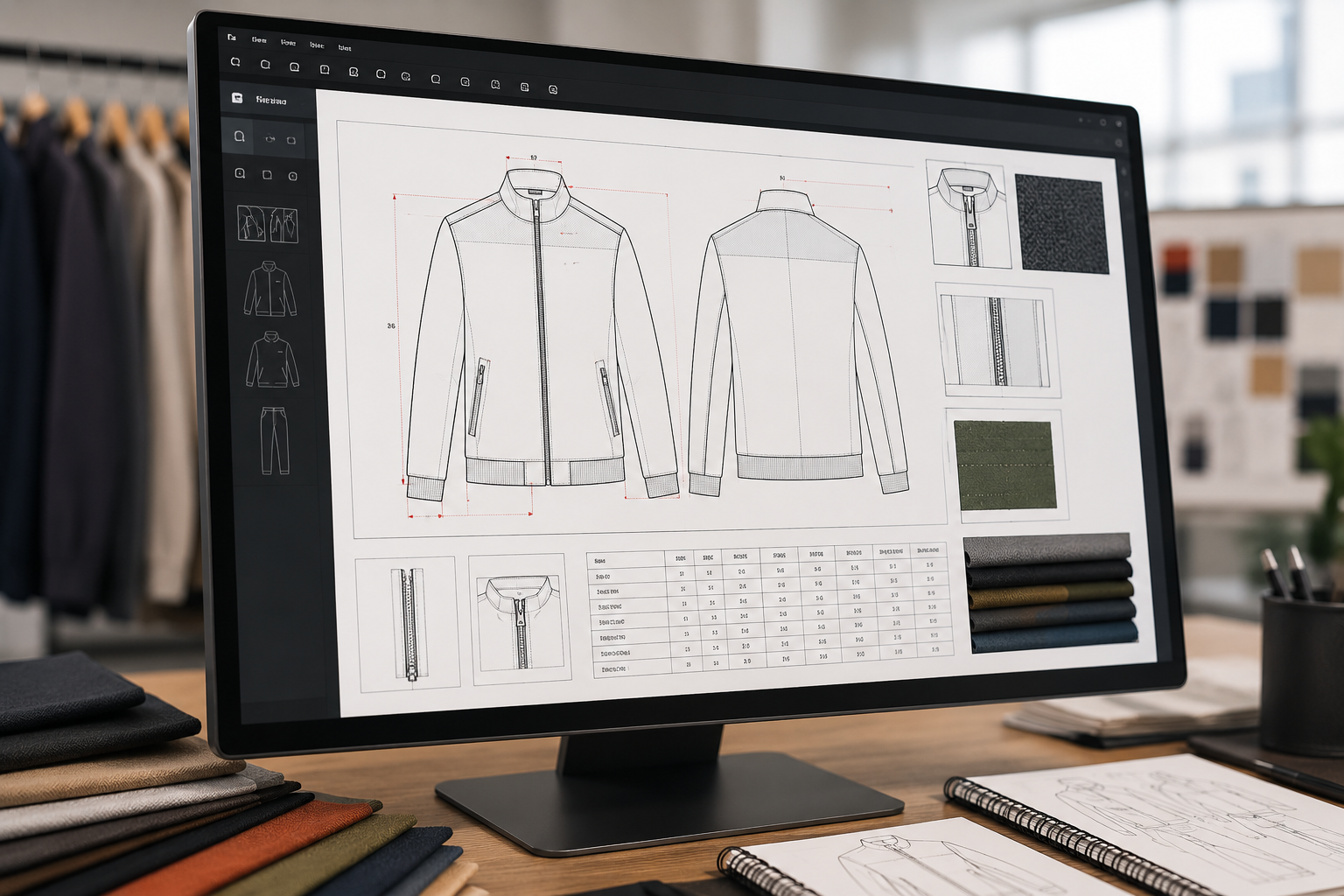
Apparel design software is most powerful when you use it to produce a tech pack your manufacturer can act on immediately. A good tech pack built inside design software includes front and back flat sketches, a bill of materials with fabric codes and trims, point of measurement tables, and construction details, all in a single exportable file.
Manufacturers spend less time asking questions when you hand them a complete document. A Brooklyn-based activewear brand reduced its back-and-forth email chain from 23 messages down to 4 after switching from hand-drawn sketches to software-generated tech packs. Their first sample hit 90% of the spec on the first try.
If you have never built a tech pack before, learn how to make a professional tech pack before approaching any manufacturer. It is the single most important document in your production process.
Why it works: Factories price and produce based on what they can see and measure. A complete digital spec removes ambiguity and reduces costly revision rounds.
Tip 2: Use 3D Clothing Design Software to Cut Sample Rounds
3D clothing design software lets you visualize how a garment fits and drapes on a virtual body before a single piece of fabric is cut. Tools like Clo3D and Browzwear allow you to adjust fit, simulate fabric behavior, and catch construction problems digitally. Each physical sample takes time and budget that adds up across multiple revision rounds. Eliminating one unnecessary round protects both your timeline and your pre-production spend.
A Los Angeles athleisure brand used 3D apparel design software to reduce their sample rounds from four to two across a 12-piece launch collection, cutting their pre-production timeline by several weeks.
Send your 3D renders to manufacturers alongside your tech pack. Many US factories now accept 3D files as part of the initial project brief, which speeds up quoting and sampling significantly.
Why it works: Seeing the garment in 3D before production removes the guesswork for both sides. Manufacturers can quote with more confidence and you can approve construction decisions before fabric is ever cut.
Tip 3: Share Precise Colorways and Material Callouts Digitally
One of the most common sample rejection reasons is incorrect colorway or fabric substitution. When you specify “dusty rose” without a Pantone code or fabric code, your manufacturer makes a judgment call. Apparel design software lets you assign exact Pantone references, fabric GSM weights, and trim codes directly on the flat sketch.
Export your color-coded design files as PDFs with embedded references and send them with your project brief. This removes color interpretation entirely and gives your manufacturer a clear baseline to source from.
Miscommunication on materials and colorways is one of the most common causes of sample rejection between US brands and domestic factories. A digital callout document built in your apparel design software eliminates this category of error before sampling begins. The American Apparel and Footwear Association publishes annual industry research covering production challenges that every US brand owner should bookmark.
Why it works: When every material and color decision is documented in the file, your manufacturer has no reason to guess. You get what you specified.
Tip 4: Collaborate on Pattern Adjustments Without Flying to the Factory
Traditional pattern correction required either in-person visits or mailing physical patterns back and forth. Modern apparel design software includes cloud-based file sharing and annotation tools that let you and your manufacturer mark up the same pattern in real time.
When a fit correction is needed, annotate the adjustment directly on the digital pattern file. Mark the inseam, note the quarter-inch hip correction, highlight the sleeve pitch change. Your manufacturer receives a marked-up file, makes the change, and sends the updated pattern back in hours rather than days.
This is especially valuable if you are working with a manufacturer in a different state. Many great US factories do not require in-person visits for every sample round if you supply well-documented digital corrections. Before committing to any factory, use the clothing manufacturer readiness checklist to confirm they have the digital communication capabilities you need.
Why it works: Cloud collaboration replaces slow physical exchanges and keeps your production timeline moving between sample rounds.
Tip 5: Document Fit Feedback in a Format Manufacturers Can Act On
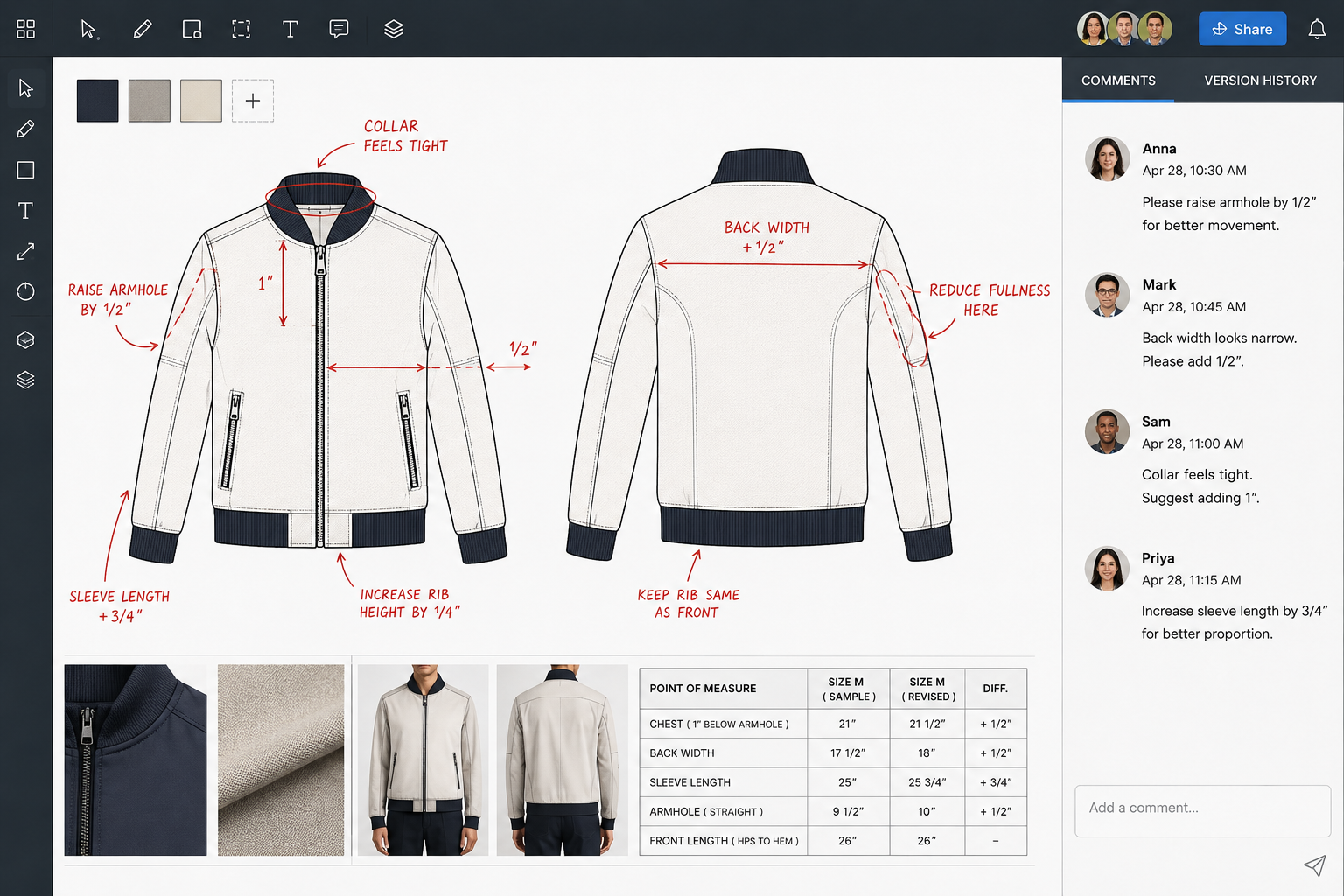
After a fit session, most brand owners send an email summary of what needs to change. Vague language leads to vague corrections. Apparel design software lets you take your fit notes and map them directly onto the flat sketch, with callout arrows and specific measurements attached to each correction point.
Export a marked-up fit feedback document after every sample review. A Chicago outerwear brand went from averaging 3.5 sample rounds per style to 2.1 after implementing structured digital fit feedback documents. Their manufacturer reported the change as the single biggest improvement to their working relationship.
Your manufacturer does not have to be in the same room to understand exactly what you need when the document does the speaking for you.
Why it works: Specific, visual feedback produces specific, accurate corrections. Vague feedback produces more rounds and more costs.
Tip 6: Use Software to Set and Communicate MOQ-Friendly Construction
Manufacturers set MOQ partly based on construction complexity. A garment with 12 separate components, multiple seam types, and specialty hardware takes more floor time than a simpler design. Before you approach a manufacturer, use apparel design software to audit your construction and simplify where possible without sacrificing your design intent.
Review your tech pack and ask: does this pocket construction require a specialist stitch? Can this detail be achieved with a more common seam? Reducing complexity can bring your required MOQ down from 300 units to 150 units at many US factories. The SCORE small business resource center advises new founders to assess product complexity before selecting a manufacturing partner, since construction requirements directly affect cost per unit and minimum order thresholds.
Send your simplified spec alongside your MOQ requirement when posting a project. Manufacturers can assess production feasibility from your design file before they bid.
Why it works: Less construction complexity means lower MOQ thresholds. Software lets you see and solve complexity before the factory sees it.
Tip 7: Create a Repeatable Design File System for Every Season
Most early-stage brands rebuild their design files from scratch every season. This slows down every new manufacturer conversation and increases the chance of inconsistency across your line. Apparel design software lets you build a master template library: your standard flat sketch styles, your go-to fabric codes, your size grading rules, your trim hierarchy.
With a library in place, your next season brief takes hours instead of weeks. Your manufacturer receives files in a consistent format they recognize, which cuts quoting time and reduces the chance of errors caused by unfamiliar file structures.
A Denver-based denim brand built a master file system after their second season and reported that their third season manufacturer onboarding dropped from three weeks to five days. To understand what a factory needs from you before production starts, read how to find a clothing manufacturer in the USA and use the file system tips above to build your brand’s production documentation package.
Why it works: Consistency builds trust with manufacturers. When they see organized, professional files every time, they prioritize your projects and price them more competitively.
How Maker’s Row Helps You Connect with the Right Manufacturer
Several of the strategies above come down to one thing: finding a manufacturer who communicates digitally, works with your production volume, and responds quickly when you send a tech pack. That is exactly what Maker’s Row is built for.
On Maker’s Row, post your apparel project for free and verified US manufacturers bid directly. Include your apparel design software files in your project brief, your tech pack, your flat sketches, your colorway spec, and manufacturers who work with digital briefs respond first. Review bids, check profiles, connect when ready.
FAQs About Apparel Design Software and Working with Manufacturers
Most US clothing manufacturers accept flat sketch files exported as PDF or AI (Adobe Illustrator) format from any major apparel design software. Programs like Adobe Illustrator, Clo3D, and Browzwear are widely recognized. When in doubt, export your tech pack as a print-ready PDF and include all callouts and measurements on the page.
No. A 3D render is a useful visual reference, but it does not replace a tech pack. Your manufacturer still needs a bill of materials, point of measurement table, and construction notes to price and produce your garment. Use 3D fashion design software to visualize and approve the design, then generate the tech pack from the same file.
Entry-level apparel design software starts at free or under $25 per month for basic flat sketch tools. Mid-tier platforms with pattern making run $50 to $200 per month. Full 3D platforms like Clo3D start at approximately $50 per month on a subscription basis. Most brands launching their first collection start with Adobe Illustrator and a solid tech pack template before investing in 3D software.
Yes. Many modern tools are built for non-designers. Clo3D’s base library includes garment blocks you can modify, and several platforms offer drag-and-drop flat sketch builders. You do not need a fashion degree to produce a manufacturer-ready tech pack using current apparel design software.
Software improves communication, not craftsmanship. A complete digital brief gives your manufacturer more to work with, which reduces misunderstandings and guesswork. Better samples come from a combination of clear specs, a capable factory, and good feedback documentation, and software enables all three.
Start Applying These Strategies Today
Your apparel brand is one manufacturer away from becoming real. The factories are on Maker’s Row, ready to bid. Give them the digital brief they need to say yes.